Remote proctoring nightmares: what licensing candidates actually deal with
If you’re about to take a remotely proctored real estate or insurance licensing exam, you need to know what you’re walking into. The short version: PSI’s software crashes mid-exam with alarming regularity, Pearson VUE’s proctors have revoked exams for wiping a nose with a tissue, and none of the major testing vendors guarantee a free retake when their own technology fails. The financial burden falls entirely on you.
That’s not fear-mongering. That’s what thousands of test-takers have reported across licensing forums, consumer complaint sites, and professional communities. Here’s what actually goes wrong, which platform has which problems, and the specific setup steps that real candidates say made the difference.
PSI: the crash king
PSI administers real estate licensing exams in the majority of U.S. states and is the dominant provider for insurance exams in states like California and New York. If you’re taking a licensing exam from home, there’s a good chance PSI is running it.
The platform’s signature problem is mid-exam crashes. On the NCARB architecture licensing forums, one candidate reported software crashes on 3 out of 4 online proctored exams. Another had issues on all 6 exams plus two retakes — white screens, 504 gateway errors, frozen browsers. These aren’t isolated complaints. The ARE 5.0 Community forum has entire threads dedicated to PSI crash reports.
But the crashes aren’t even the worst part. In one case documented on PissedConsumer, a real estate exam candidate had 15 questions left with 26 minutes on the clock when the proctor paused the test because they lost the webcam feed on their end. The candidate’s internet was fine. After forcing a browser restart and a second room scan, the timer had already lapsed. The proctor forgot to pause it. Those 15 questions went unanswered. The candidate failed.
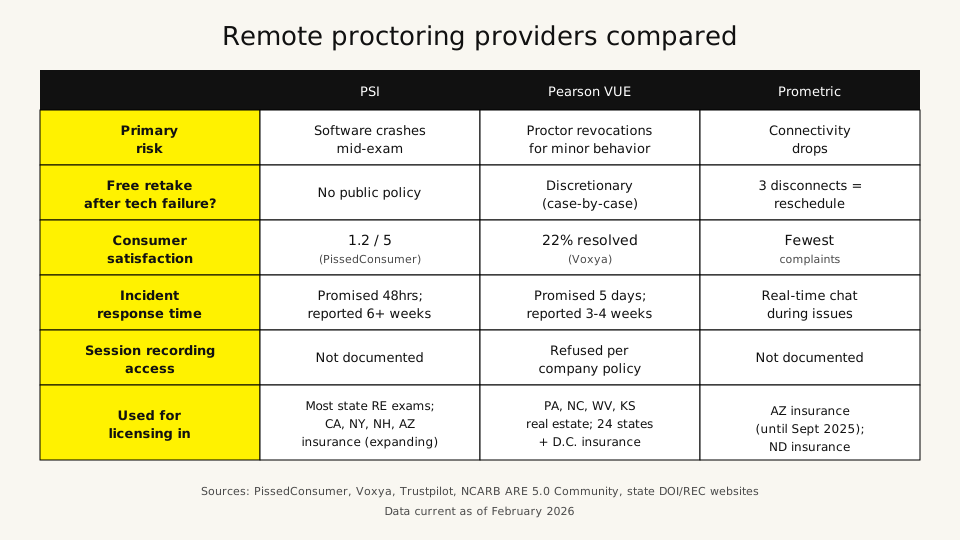
PSI’s customer service rating on PissedConsumer sits at 1.2 out of 5. They promise incident reports within 48 hours, but candidates on the NCARB forums have reported waiting six weeks without a response. One insurance exam candidate reported PSI gave them three different ticket numbers for the same issue, suggesting tickets were being closed as “resolved” and reopened as new cases.
The insurance licensing community’s take is telling: “The same company PSI runs a horrible online proctor system but their in person testing center is top notch.” When the people who use the platform are telling you to avoid the online version, listen.
Pearson VUE: the revocation machine
Pearson VUE handles real estate exams in Pennsylvania, North Carolina, West Virginia, and Kansas, plus insurance exams in 24 states and D.C. Their remote platform is called OnVUE.
Where PSI’s problem is technical instability, Pearson VUE’s problem is overzealous proctors. The list of documented reasons for exam revocation reads like parody:
- Wiping a nose with a tissue during a cold. Exam terminated within 10 minutes.
- Rocking back and forth in a chair. Revoked.
- Adjusting a laptop charging cable because the battery was dying. Marked as “misconduct.”
- “Rotating eyes to watch the time on screen.” Cancelled.
- Moving slightly out of webcam view. “You have moved from webcam view. I’m now revoking the exam session.”
These aren’t hypothetical scenarios. Every one of them is documented on Trustpilot, Voxya, or AWS re:Post with specific details from the candidates involved.
The financial hit compounds fast. One candidate reported losing over $350 per day in wages during retakes. Another lost their job because they couldn’t obtain the required certification after Pearson VUE revoked a $500 exam and wouldn’t reschedule it. A CompTIA instructor reported 2 out of 4 students experiencing software malfunctions during a single testing session.
When candidates request exam session recordings to understand what triggered the revocation, Pearson VUE refuses. Company policy. You can’t see the evidence against you, and you can’t appeal what you can’t see. On the Cisco Learning Network, one poster titled their thread “Pearson VUE fabricated revocation report,” alleging the stated reasons didn’t match what actually happened. With no recording access, there’s no way to verify.
Pearson VUE’s satisfaction rate on Voxya: 22.22%. Four out of eighteen complaints resolved.
Prometric: the least bad option
Prometric administers insurance exams in Arizona (until September 2025) and North Dakota. For remote proctoring, they generate significantly fewer complaints than PSI or Pearson VUE.
Their approach is more transparent. If you get disconnected three times, the proctor asks you to reschedule. That’s a clear, stated policy. Their ProProctor platform includes a real-time chat feature for communicating during technical issues. Candidates who previously tested with Prometric and were switched to PSI describe the change as “a downgrade in every way.”
Prometric isn’t perfect — connectivity-driven terminations still happen, and wireless connections are specifically flagged as problematic. But the gap between Prometric and the other two is wide enough that NCARB candidates openly lobbied to switch back after being moved to PSI.
The AI flagging problem nobody talks about
Behind every human proctor is an AI system watching you. These AI proctoring tools average 57 flags per exam. That’s roughly one flag every two minutes during a two-hour test. Most flags are reviewed by a human proctor who decides whether to intervene, but the sheer volume means false positives are baked into the system.
The bigger issue is bias. Facial recognition models used by proctoring software failed to detect faces in images of Black individuals 57% of the time, according to research into Proctorio’s system. A 2018 study by Buolamwini and Gebru found error rates of 0.8% for light-skinned men compared to 34.7% for darker-skinned women. If the system can’t reliably see your face, it flags you. If it flags you enough times, a proctor intervenes or revokes.
Students wearing religious head coverings have reported being temporarily barred from accessing proctoring software. Candidates with ADHD whose fidgeting triggers “suspicious movement” alerts get flagged at higher rates. The algorithms weren’t designed to discriminate, but the effect is discriminatory.
PSI itself has acknowledged the problem. Their own knowledge hub admits that “current AI-enhanced proctoring systems suffer from high false-positive rates, limited contextual understanding, and excessive focus on facial monitoring.” They’re describing their own product.
What happens when it goes wrong: the retake mess
Here’s where it really stings. None of the three major providers guarantee a free retake when their technology fails.
PSI doesn’t publish a standardized retake policy for technical failures. You file an incident report, wait (sometimes six weeks), and hope. Real estate exam retake fees run $43 to $63 per attempt depending on your state.
Pearson VUE reviews incidents on a “case-by-case basis” and may issue a discretionary voucher code for a free retake. May. They promise a review within 5 business days but candidates report 3 to 4 weeks. If your exam was revoked for alleged misconduct — like adjusting a charging cable — you also face a mandatory 15-day waiting period before you can retest.
Prometric has the most predictable policy: three disconnects and you reschedule. But “reschedule” doesn’t necessarily mean “free.”
The cost isn’t just the retake fee. It’s the lost study momentum, the anxiety of wondering if the same thing will happen again, and for people transferring licenses across states with deadlines, potentially weeks of delay that affect their ability to work.
States are already reacting
The most significant signal: Texas discontinued OnVUE remote proctoring for insurance licensing exams in March 2024. If you’re sitting for a Texas Department of Insurance exam, you’re going to a physical test center. Period.
Other recent changes worth tracking:
- North Carolina switched real estate exams from PSI to Pearson VUE in March 2024. NCREC called it “HERE and it is GOOD!” — suggesting they weren’t thrilled with PSI either.
- Pennsylvania authorized OnVUE remote proctoring for real estate in late 2024, expanding remote access.
- Connecticut added PSI remote proctoring for real estate in May 2025.
- Arizona switches insurance exams from Prometric to PSI in September 2025, with a blackout window from August 24 to September 3 where no state exams are available at all.
- New Hampshire moves insurance exams from Prometric to PSI in June 2025.
The direction is mixed. Some states are pulling back from remote proctoring (Texas). Others are expanding it (Pennsylvania, Connecticut). But the provider shuffling creates its own chaos, especially for candidates pursuing licenses in multiple states who may encounter different platforms depending on which state they’re testing in.
The setup checklist that actually reduces failures
The candidate who finally had a crash-free PSI exam after three straight failures posted exactly what they changed. Combined with tips from dozens of other test-takers across licensing forums, here’s what consistently works:
Network setup (the most important part):
- Use a wired Ethernet connection. Not Wi-Fi. Not “really strong” Wi-Fi. A physical cable from your router to your computer.
- Disconnect from Wi-Fi even while using Ethernet. This is the tip that fixed it for the candidate with three crashes. Prometric diagnosed the crashes as “internet interruptions” even though Ethernet was connected — background Wi-Fi was interfering.
- Restart your router before the exam. Not during. Before.
- Kick everyone else off the network. No streaming, gaming, or video calls on the same connection during your exam window.
Computer setup:
- Run the compatibility check at least a week before exam day. Same computer. Same location. Same approximate time of day.
- Use a personal computer, not a work machine. Corporate firewalls, VPNs, and security software cause constant compatibility failures.
- Mac users: check Security & Privacy settings for Microphone, Camera, Automation, and Input Monitoring permissions. Recent macOS updates have broken Secure Browser compatibility. M1 Mac users may need Rosetta enabled. Some candidates had to create a brand-new user account without extra configuration.
Room setup:
- Over-light your room. Overhead lighting, daylight quality or brighter. Poor lighting triggers webcam verification failures.
- Clear everything off your desk. No notes, phones, water bottles, pens. Nothing unless the exam program specifically allows it.
- Lock the door. Put a sign outside. Tell everyone in the household. A knock on the door — even from outside a closed room — has caused revocations.
- Secure pets in another room. A cat walking across your desk can trigger a flag.
During the exam:
- Don’t take breaks if you’re on a crash-prone platform. The candidate with three PSI crashes cited skipping the break as one of their key changes.
- Don’t read questions aloud or move your lips. Documented flag trigger on all platforms.
- Minimize body movement. Don’t lean, rock, scratch your face, or look at the screen clock with exaggerated eye movements. Pearson VUE has revoked exams for rocking in a chair.
If your exam gets revoked or terminated
Document everything immediately. Screenshot error messages if you can. Write down exact times and proctor messages verbatim.
Contact the credentialing body directly — your state real estate commission or department of insurance — not just the testing vendor. The state board is the testing vendor’s client, and they have leverage you don’t.
Request session recordings from the vendor. Pearson VUE will refuse, but the request creates a paper trail that matters if you escalate. File complaints with the BBB and consumer complaint platforms. On the CompTIA Instructors Network, one poster reported that after “several emails and phone calls requesting recording copies and threatening legal action,” Pearson VUE reviewed the situation and issued a free retake voucher.
File your complaint within the required window. For NCARB/PSI, that’s 15 days from the appointment date. Miss that window and you may lose any recourse.
The honest recommendation
If you have the option to take your exam at a physical test center, take it there. In-person testing eliminates the software crashes, the webcam flags, the proctor roulette, and the helpless feeling of watching your timer tick down while someone in a call center decides whether to pause it. The consensus across every licensing forum surveyed for this article is the same: remote proctoring is a gamble that sometimes pays off and sometimes costs you hundreds of dollars and weeks of delay.
If remote is your only option — because your nearest test center is two hours away, or the scheduling backlog is months long — the setup checklist above is your insurance policy. Follow every step. The candidates who report smooth remote exams aren’t lucky. They’re prepared.
If you’re transferring a license and need to sit for a state-portion exam in your destination state, check which vendor administers that exam before you schedule. PSI, Pearson VUE, and Prometric each have different failure modes, and knowing what you’re dealing with lets you prepare accordingly. The exam waivers guide covers which states let experienced agents skip the exam entirely — and after reading this article, you might want to check if you qualify.